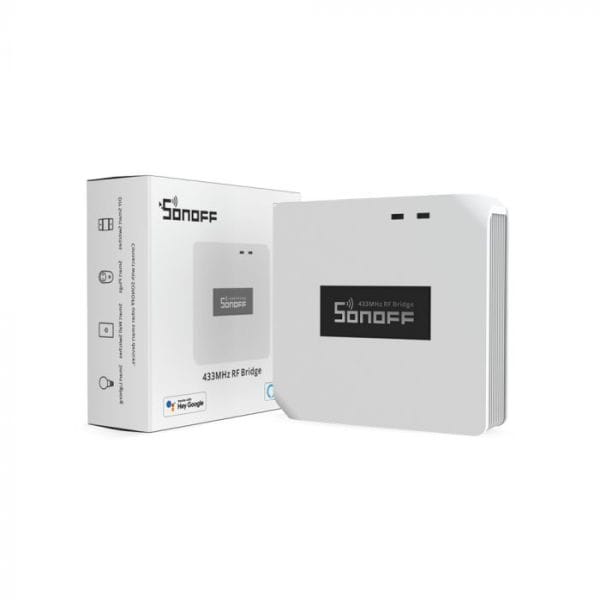


Sonoff RF Bridge 433 MHz communicator
- EAN code: 6920075776560
- Product code: SON-KIE-BRI-R2
- In stock (delivery 1-3 days)
The Sonoff Bridge establishes a connection between 433.92 MHz radio frequency (RF) smart controllers and WiFi-equipped eWeLink smart devices that are remotely controlled over the internet, and connects RF (wireless) sensors to the eWeLink platform to control Sonoff relays, switches and smart sockets. R2 is the latest version, released in Q3 2021, with an improved RF receiver and RF transmitter.
20,40 € Original price was: 20,40 €.15,30 €Current price is: 15,30 €.
The Sonoff RF Bridge 433 is a bi-directional WiFi-RF and RF-WiFi bridge or gateway, which connects radio frequency (RF) smart controllers to eWeLink compatible Sonoff and SmartWise smart devices.
R2 is the latest version, released in Q3 2021, with an improved RF receiver and RF transmitter.
Functions and modes of operation:
(1) RF to WiFi (RF signal reception):
Sonoff RF Bridge with built-in 433.92 MHz RF receiver receives the signal from radio remote controls and sends on/off commands over WiFi (via the eWeLink cloud) to eWeLink smart devices (those that don't support RF remote control). So for example the Sonoff TH10/TH16, Sonoff POW R2 or Sonoff Dual relay switches become devices that can be remotely controlled with a Sonoff 4 or 8 button RF remote control.
In addition to RF remote controls, you can Sonoff RF Bridge you can also connect 433.92 MHz RF sensorssuch as Sonoff PIR2 RF motion sensor and Sonoff DW1 RF door/window sensor. You can set the SmartScene function in the eWeLink app to automatically switch on other devices (e.g. Sonoff T1 EU switch, Sonoff relay or other eWeLink devices) when motion is detected or doors/windows are opened.
The Sonoff Bridge can control up to 16 RF devices (remote controls, motion sensors or door/window sensors).
Compatible Sonoff sensors:
- Sonoff PIR2 433.92 MHz RF (wireless) motion sensor. Receive an alert on your iOS/Android phone via the eWeLink app, or set up SmartScene to automatically turn on other smart devices based on the motion signal. (The sensor does not send a signal when the movement stops, only when detected.)
- Sonoff DW1 Magnetic RF (wireless) door/window sensor. Via eWeLink, you receive an alert when doors/windows are opened and can set SmartScene to automatically switch on other devices. (The sensor only sends a signal when opening, not when closing.)
- SmartWise DW2 improved magnetic RF sensor for doors/windows. Receive opening and closing alerts via eWeLink and set SmartScene to automatically switch on devices.
Compatible RF buttons and RF switches:
- Sonoff 4-button RF remote control
- Sonoff 8-button RF remote control
- SmartWise RF1 / RF2 / RF3 RF wall switches
- SmartWise T1R1 / T1R2 / T1R3 RF wall switches
- SmartWise RF button / doorbell
Note: when the alerts function is activated, only the owner of the device receives an alert, users with a shared account do not receive alerts.
(2) WiFi to RF (sending an RF signal):
The RF Bridge also supports WiFi to RF communication: it sends an RF signal to RF compatible devices as configured in the eWeLink app.
This means that you can manage your eWeLink app RF (but not WiFi) smart devices (any brand), e.g. RF switches, RF plugs, RF bulb sockets, RF door openers, which you add to the Sonoff Bridge and then control only via WiFi. If you connect the RF Light Switch to the RF Bridge, you can switch it on/off via the internet via the eWeLink app.
RF Bridge copies and simulates signals Sonoff 4 or 8-button remote control from the eWeLink app - both locally and over the internet if the RF remote is not handy or is lost, and can thus control any compatible RF smart device from the eWeLink app. To do this, you need to pair all buttons of your RF remote control with the RF Bridge, which recognises and stores the signals of all connected buttons. The RF transmitter then sends the same signal to the managed device when the app sends a command.
A schematic of how this mode works:
You can control up to 16 devices x 4 channels when sending RF signals, i.e. up to 64 RF devices (e.g. control of up to 16 Sonoff 4-button remotes: 16 controls x 4 buttons = 64 controls).
Notes:
- The RF receiver is compatible with fixed codes at 433.92 MHz, e.g. PT2260, PT2262, PT2264, EV1527, etc.
- It does not support dynamic or rotating RF device codes, only fixed codes and devices.
- Status changes (On/Off) are not displayed in the application if they are sent from RF devices.
- The Sonoff RF Bridge is powered via a standard 5V microUSB power adapter (like most smartphones), not included.
Product features:
- It allows WiFi devices to be controlled with 433 MHz RF remote controls, making even non-RF-enabled devices controllable with RF remote controls and WiFi devices via the eWeLink platform.
- Converts 433.92 MHz RF smart devices (with RF remote, without WiFi) into eWeLink controllable devices (also remotely via the internet).
- Timer: 8 settings, countdown/repeating schedule for switching on/off RF devices.
- You can receive alerts to your phone from 433 MHz motion sensors and Sonoff door/window sensors.
- Free app for iOS and Android (eWeLink).
- Up to 16 devices can be connected when receiving RF signals, and up to 16 x 4 devices when sending RF signals.
- Compatible with Amazon Alexa and Google Assistant.
Works with Amazon Alexa!
To voice control the Sonoff RF Bridge via Alexa, use the name of the remote control and the button name together in the voice command.
Basic voice commands:
- Alexa, turn on {RF remote control name} (turns on all buttons)
- Alexa, turn off {RF remote control name} (turn off all buttons)
- Alexa, turn on {RF remote control name} {button name} (turn on one button)
- Alexa, turn off {RF remote control name} {button name} (turn off one button)